
ELD · GPS tracking · Dispatch · AI dash camera
Every mile, on record.
Every hour on the road is a record. ELD Runner Pro makes it effortless to keep, so drivers can drive and fleets can grow.
- 30-day free trial
- No long-term contract
- Cancel anytime
Our products
Everything your fleet needs, in one place
ELD compliance and GPS tracking today, with a dispatch board and an AI dash camera on the way.
-
ELD compliance
Electronic logbook, roadside inspection mode and DVIR for every driver.
See the driver app -
GPS tracking
Live map, tracking history, IFTA reports and location sharing for your office.
See the fleet portal -
Coming soon
Dispatch board
Keep track of your loads and keep drivers and dispatchers in sync.
-
Coming soon
AI dash camera
Built to help protect your drivers, improve safety scores and save on insurance.
Learn more
Driver app
Less paperwork. More road.
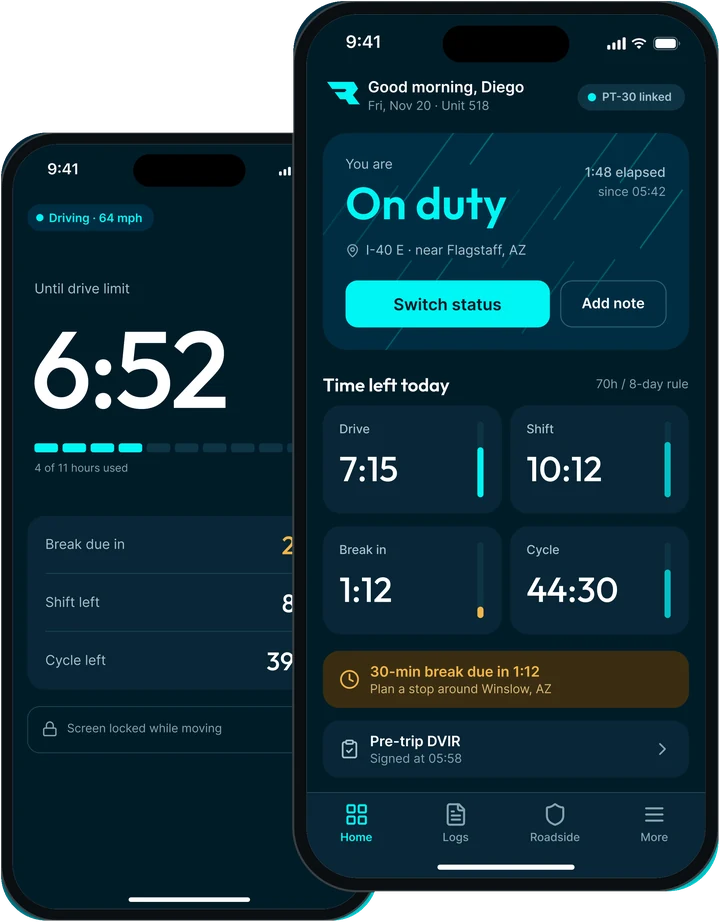
Four tabs: Home, Logs, Roadside and More. Everything a driver needs is one tap away.
-
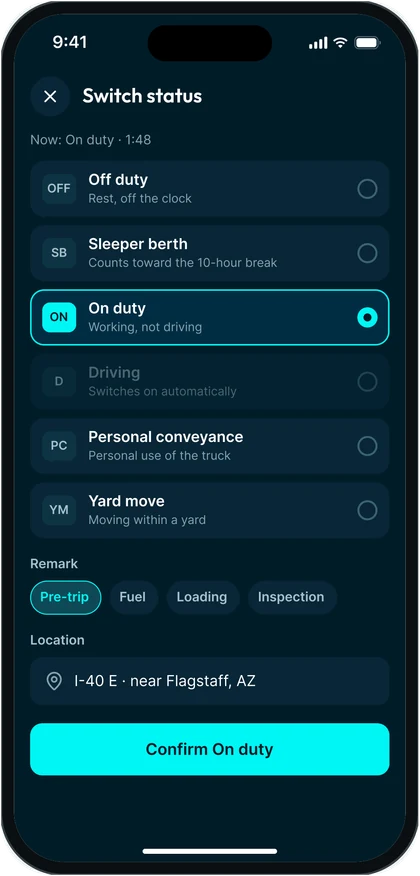
Switch status in one tap
Off duty, Sleeper berth, On duty, Personal conveyance or Yard move. Driving switches on by itself once the truck moves.
-
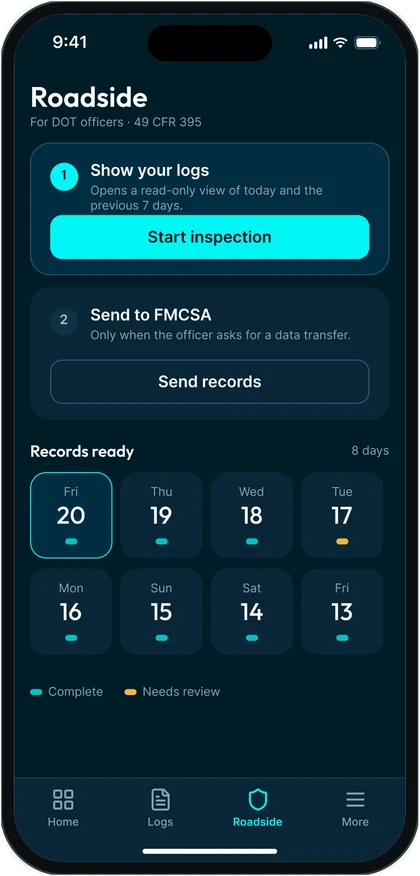
Ready for the officer
8 days of logs, ready for the officer in one tap. The officer gets a read-only view and cannot edit anything.
-
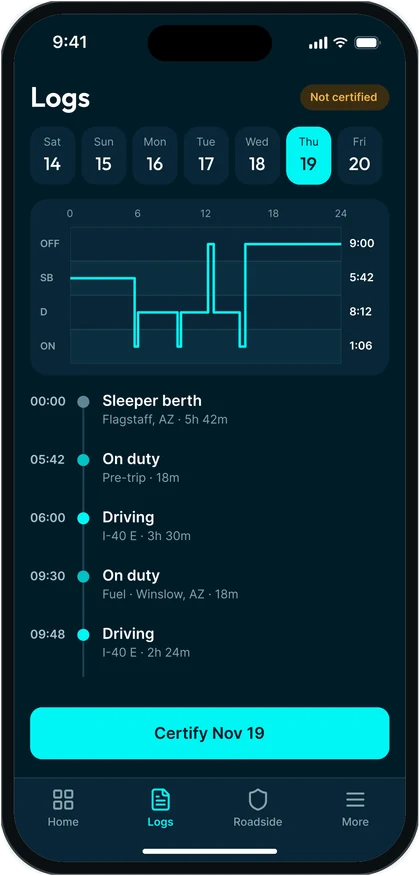
Review and certify your log
Every status change shows its time, place and duration. Check the day, then certify it.
-
Live hours-of-service clocks
Drive, shift, break and cycle time left, plus a heads-up before your 30-minute break.
-
Send records to FMCSA
When the officer asks for a data transfer, send your logs by web service or email.
-
Electronic DVIR
Complete and sign pre-trip inspection reports right in the app.
-
Malfunction alerts
If the ELD has a problem, the app shows the malfunction code and what to do next.
-
Screen locks while moving
The app locks the screen while the truck is moving, so the driver can focus on the road.
-
Co-drivers and unidentified events
Add a co-driver and review unidentified driving events from the More tab.
Fleet portal
Compliance that keeps pace.
The web portal shows where every truck is, how many hours every driver has left, and what needs your attention today.
-
Live fleet map
See each truck's location, duty status, speed and fuel level.
-
Logs and violations
Review drivers' logs and spot hours-of-service violations early.
-
Tracking history
Look back at where a truck has been on any day.
-
IFTA and fleet reports
Get miles by state for your quarterly IFTA filing, plus reports for your office.
-
Live location sharing
Share a truck's live location with brokers and shippers.
-
Weather, fuel and stops
See weather, weigh stations, CAT scales and truck stops with fuel prices on the map.
Integrations
Works with the platforms your customers use
Connect the third-party apps your brokers and shippers rely on to share real-time data, work faster and cut costs.
-

Descartes MacroPoint
Load tracking and end-to-end visibility through every stage of the trip, from one provider.
-

FourKites
Real-time visibility, so your customers see the exact location of your trucks and shipments.
-

project44
Supply-chain visibility that keeps your vehicles visible to shippers at all times.
-

Trucker Tools
Load tracking and digital freight matching that helps cut your costs.
-

Go Highway
Helps brokers identify and verify carriers.
-
Trucker Cloud
Connects your ELD data with the apps you choose, so you get insights faster.
Built for the road ahead.
Precise, always on, and calm under pressure. Built for fleets that run on time.
Start free trialAI dash camera Coming soon
Every mile, on camera.
Our AI dash camera is on the way. It is built to help you protect your drivers, improve your safety scores and save on insurance.
- Record. Video of what really happened on the road.
- Analyze. AI flags risky moments, so you can coach drivers.
- Improve. Better safety scores and lower insurance costs.

ELD device
Connect your ELD in three steps
Pair the device once. After that, the app reconnects on its own.
-
Find the diagnostic port
It is usually under the dashboard, to the left of the steering column.
-
Plug in the matching cable
Use the connector that fits your truck. See the cable types below.
-
Pair in the app
Turn Bluetooth on, open More, then Connect ELD, and tap Pair. The Home screen shows the device as linked.
Cables for every truck
-
9-pin J1939
Most heavy trucks
-
6-pin J1708
Older trucks
-
OBD-II 16-pin
Light and medium duty
Pricing
One simple plan
Everything your drivers and your office need, in one plan. Try it free for 30 days. No long-term contract, and you can cancel anytime.
Questions? Read the FAQStandard
$75/month
- Driver app with electronic logbook (ELD)
- Roadside inspection mode and data transfer
- Electronic DVIR
- Real-time fleet dashboard
- GPS tracking and tracking history
- Fuel stops, fuel prices and weather on the map
- Live location sharing
- IFTA reporting
30-day free trial · Cancel anytime
FAQ
Questions fleets ask us
Is there a free trial?
Yes. You can try ELD Runner Pro free for 30 days. Fill out the form below to get started.
Do I have to sign a long-term contract?
No. There is no long-term contract, and you can cancel anytime.
What do drivers need?
A phone or tablet with the ELD Runner Pro app and Bluetooth turned on, and the ELD device plugged into the truck's diagnostic port.
Which trucks does the ELD work with?
There are cables for 9-pin J1939 ports (most heavy trucks), 6-pin J1708 ports (older trucks) and OBD-II 16-pin ports (light and medium duty).
Does ELD Runner Pro work with load-tracking platforms?
Yes. It connects with Descartes MacroPoint, FourKites, project44, Trucker Tools, Go Highway and Trucker Cloud.
Do you offer a dash camera?
An AI dash camera is coming soon. Ask about early access when you request your free trial.
What happens during a roadside inspection?
The driver opens the Roadside tab and taps Start inspection. The officer sees a read-only view of today and the previous 7 days. If the officer asks for a data transfer, the driver sends the records to FMCSA by web service or email.
What if the ELD stops working?
The driver notes the malfunction code, tells the carrier in writing within 24 hours, and keeps paper logs until the ELD is fixed.
How long are logs kept?
Records of duty status are kept for at least 6 months, as federal rules require (49 CFR 395.8(k)).
Who is responsible for hours-of-service compliance?
Your company, as the motor carrier, and your drivers stay responsible for following the hours-of-service rules. ELD Runner Pro gives you the tools to record, review and manage that work.
Free trial
Start your 30-day free trial
Tell us about your fleet, and we will contact you to set up your trial.
- Driver app and fleet portal
- No long-term contract
- Cancel anytime
Runner ELD LLC
1819 John F Kennedy Blvd, Ste 307Philadelphia, PA 19103